- DATE:
- AUTHOR:
- Dutchie Product Team
Dutchie POS: View user activity for in-progress transactions; new pick ticket settings and improvements; require manager PIN for customer groups; fixes
Projected release dates: 8/3/26-8/6/26. Subject to change.
Enhancements
Register
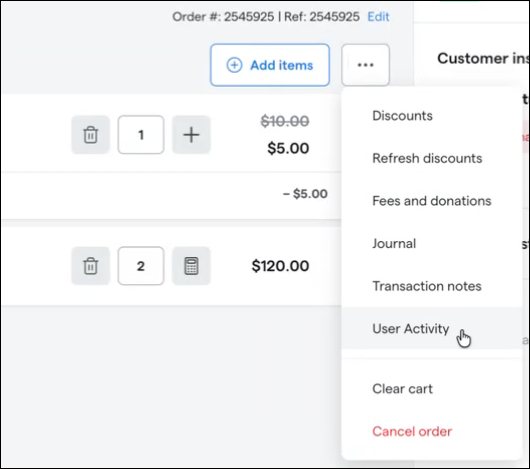
Register users will soon be able to view the User Activity log for in-progress transactions, as opposed to only for completed transactions. The updated activity view also adds User and Activity filters and sortable columns so you can more easily review the log by action and by user.
Register screen layouts will be further optimized to work more reliably across different screen sizes. These updates make close-out and cash-detail workflows clearer by preventing panels and fields from overlapping or covering important information.
Pick Tickets
We’re adding Master Category as an option for grouping and sorting line items in pick ticket settings. This gives fulfillment teams another way to organize printed pick tickets by high-level product type, helping staff locate items more efficiently while picking orders.
Pick ticket settings will also include an optional subtotal line. When enabled, printed pick tickets show a pre-discount, pre-tax subtotal based on the item prices already listed on the ticket, giving fulfillment teams a quick total to reference during order preparation.
The Print Cart action will consolidate line items for the same product, batch, and price into a single line with a quantity indicator instead of separate line items for each unit.
Customers
Loyalty history will be made available to locations using basic Dutchie Loyalty, not just Loyalty & Marketing subscribers. Customer loyalty history also includes clearer details, including the current balance and who created or approved loyalty ledger activity.
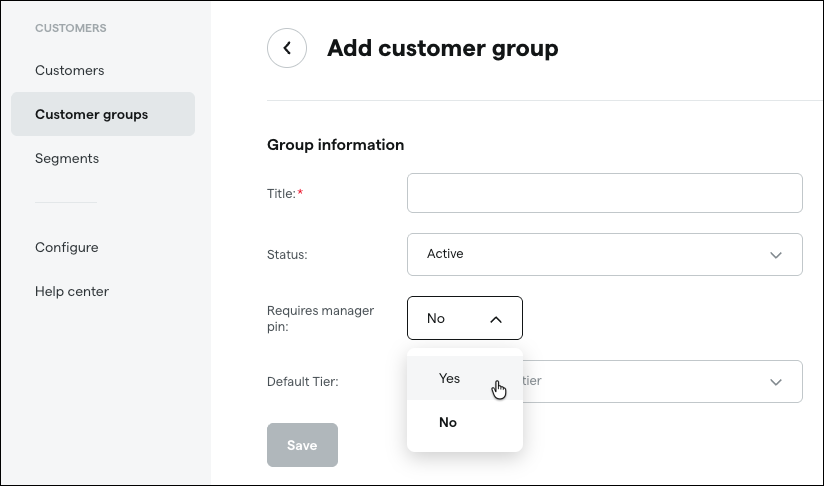
Customer groups will gain a new option to require manager approval before a customer can be assigned to them. When set to Yes, both Backoffice and Register workflows prompt for a manager PIN, helping you better control access to restricted discount or customer groups.
Dutchie Public API
The Inventory Roll Forward report will be made available through the Dutchie Public API. You can request roll-forward inventory data by date range, making it easier to power external reporting, reconciliation, and business intelligence workflows.
Reports
The New Pre Orders static report now includes Guestlist Status and Pickup/Delivery Time Window fields. Fulfillment teams can use the export as a more complete packing list, helping them prioritize orders and reduce manual cross-checking during pickup and delivery operations.
Integrations
Delivery time windows requested by customers will now sync to Onfleet when delivery tasks are created. This helps delivery teams see the correct requested window in Onfleet, reducing manual coordination and making scheduled deliveries easier to fulfill on time.
Fixes
COA PDF uploads from Confident Cannabis-affiliated labs will return complete lab result data, including terpene and cannabinoid results, even when the PDF was scanned or image-only. This reduces manual re-entry and helps teams keep inventory and product labeling records accurate.
Loyalty values in customer Transaction History will display more clearly for accounts using Loyalty as a Discount. This helps teams distinguish loyalty points from cash amounts and reduces confusion when reviewing loyalty activity.
Assembly batch selection will include eligible existing batches across locations within the same LSP. This helps teams reuse the correct source batches for BOM and assembly workflows instead of creating duplicate batches or re-entering lab results.
Register label printer selection will respect the intended label printing configuration when Print Service settings are enabled. This restores access to available label printers in the POS and helps prevent disruptions to label printing during store setup and go-live workflows.
Cultivation Integration Audit now uses refreshed Metrc plant room data so the External Room value reflects the current room after packages or plants are moved. This helps teams reconcile room information more accurately between Dutchie and Metrc.
Dutchie allotment calculations now correctly include all qualifying transactions within the customer’s cycle period after an allotment cycle adjustment. This helps ensure internal dispensed amounts stay accurate for compliance and customer purchase-limit tracking.
Metrc allotment refreshes now wait for the sales receipt submission to complete before checking updated patient limits. This helps receipts and post-sale allotment values reflect Metrc’s latest deduction more reliably.
Workflow message reporting now shows consistent counts for executions, interruptions, and recipients. This makes it easier to understand how many customers successfully reached each message step and to validate workflow performance.
Tax-exempt customer types are no longer charged tax when Out the Door pricing is disabled. This ensures tax exemptions are honored consistently across pricing configurations and supports broader rollout of OTD tax exemption improvements.
Onfleet integration settings now display all configuration fields as soon as the page loads. This makes it easier to review and update delivery integration settings without needing to click Save first, while still loading team options when a valid API key is available.
