- DATE:
- AUTHOR:
- Dutchie Product Team
Dutchie POS: New options for online loyalty widget and redemption options display; Manage batches, lab results, and associated packages all in one place
Projected release dates: 6/8/26-6/11/26, unless otherwise noted. Subject to change.
Enhancements
Loyalty & Marketing
We have added new settings to give you greater control over how your loyalty program is presented in Dutchie E-Commerce web and mobile apps. Note that these settings apply to all of your locations.
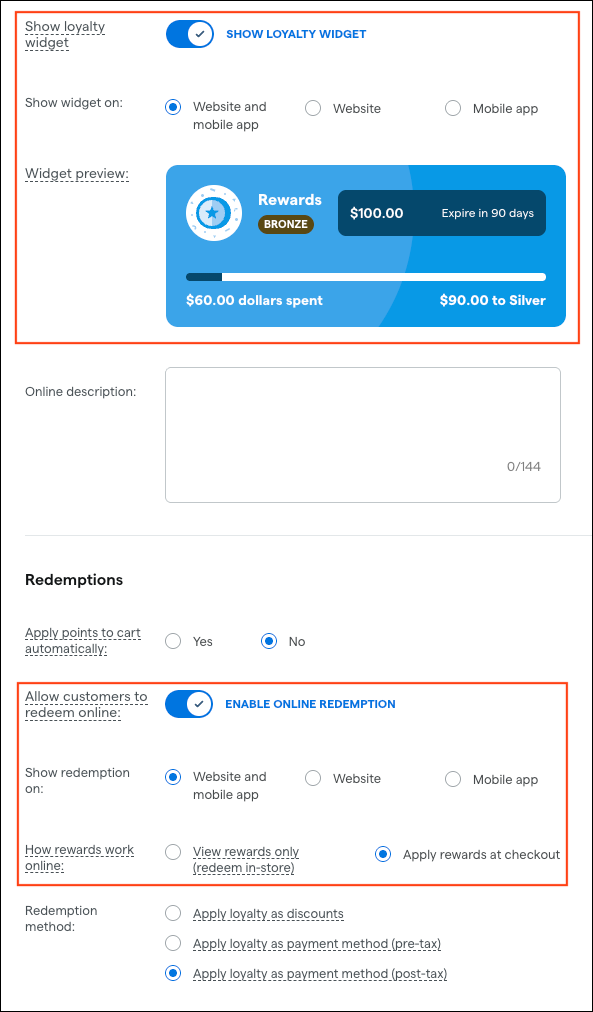
Show loyalty widget
By default, the widget showing a customer’s loyalty point status appears on your home page and in the customer’s My account menu. You can now choose to hide the widget altogether, or choose whether it appears on your web menu, mobile app, or both.
Allow customer to redeem online
By default, loyalty redemption options appear online when your loyalty members check out. You can now:
Hide redemption options altogether
Choose whether they appear on your web menu, mobile app, or both
Choose whether to allow loyalty members to apply their rewards at checkout, or only view their available rewards and redeem them in-store when they pick up their order. The view-only option is helpful if you want to restrict online discount stacking.
These settings are available now for all Loyalty & Marketing users.
New Batches page in Backoffice
The new Products > Batches page in Backoffice allows you to edit batch details, review lab results, and see related packages across locations in one place, reducing duplicate records and speeding up compliance checks.
Edit batches where you manage products – Update batch names, strains, and key dates directly in Products, so teams no longer need to dig into Cultivation just to fix a batch. This makes batch editing more discoverable and helps prevent duplicate or inconsistent batch records.
See rich lab results without running reports – View detailed cannabinoid, terpene, and contaminant data right on the batch, including visual summaries and access to the COA. This lets staff quickly confirm potency and safety information during compliance checks, merchandising decisions, or customer conversations—without exporting or opening separate lab reports.
Understand every package tied to a batch across locations – Access a cross‑location view of all packages associated with a batch, including inventory status and links back to package details. This gives teams a single source of truth for where a batch is selling, what’s still in stock, and where discrepancies might be coming from.
This is now available for all locations with cultivation features enabled. Learn more in the Help Center.
Discounts
When configuring discount requirements and rewards, the filter modals display all product options, including those with no eligible products. This creates unnecessary noise and makes it harder to quickly find and select the options that actually apply to the discount.
To address this, the Hide options with no eligible products checkbox in the Discount Wizard's requirements and rewards filter modals will default to checked/on so non-eligible options are hidden by default. You will still be able to uncheck the box to see all products as needed.
Campaigns
We’re removing a restriction that currently enforces a rule of one active blast campaign at a time (i.e., an active SMS blast campaign blocks an email blast campaign from starting) and will instead start enforcing this rule on a per-channel basis (i.e., there can be more than one active blast campaign at a time as long as they’re different channels – one SMS campaign, one email campaign, and one push campaign).
Fixes
We’re releasing fixes for the following issues:
When creating a new package from an existing package, the parent package’s manufacturing date will now be carried over to the child package.
Wholesale tax on receive may not apply to certain customer types such as Cultivator or Processor even when the tax is correctly configured to apply to those customer types.
We’re releasing a fix for issues that prevent CSV exports and imports for Bills of Materials.
