- DATE:
- AUTHOR:
- Dutchie Product Team
Dutchie POS: Floor-depleted inventory alerts; revamped pricing tiers UI; campaign and segment enhancements; fixes; and more
Projected release dates: 7/20/26-7/23/26, unless otherwise noted. Subject to change.
Enhancements
Inventory
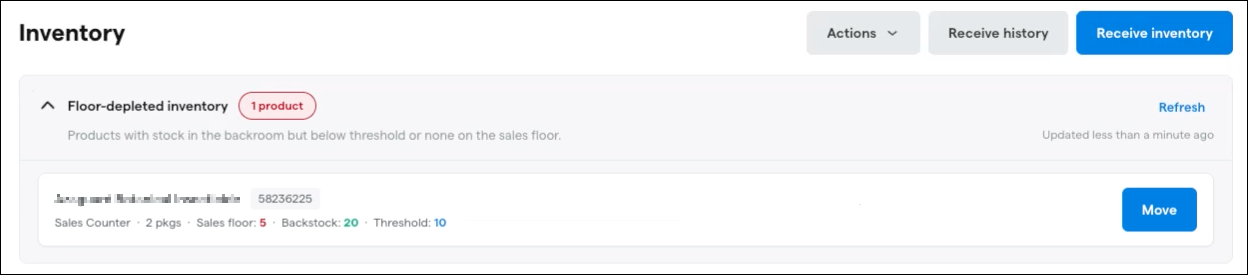
Floor-depleted inventory alerts will appear on the Inventory page whenever a product with available backstock falls below a set threshold on your sales floor so inventory managers can move inventory from other rooms to your sales floor and keep the product available on online menus.
Alerts will show the product name and SKU, how many packages exist, current sales floor inventory, backstock inventory (i.e., total quantity in other rooms) and the product’s low inventory threshold. Click Move to instantly reassign quantity to your sales floor. Learn more about floor-depleted inventory alerts in the Help Center.
Metrc Retail ID
A new Associate existing Retail IDs action on the Manage Retail IDs menu now allows producers and retailers to associate existing Retail IDs from a parent package to a child packages. Learn more in the Help Center.
Pricing Tiers
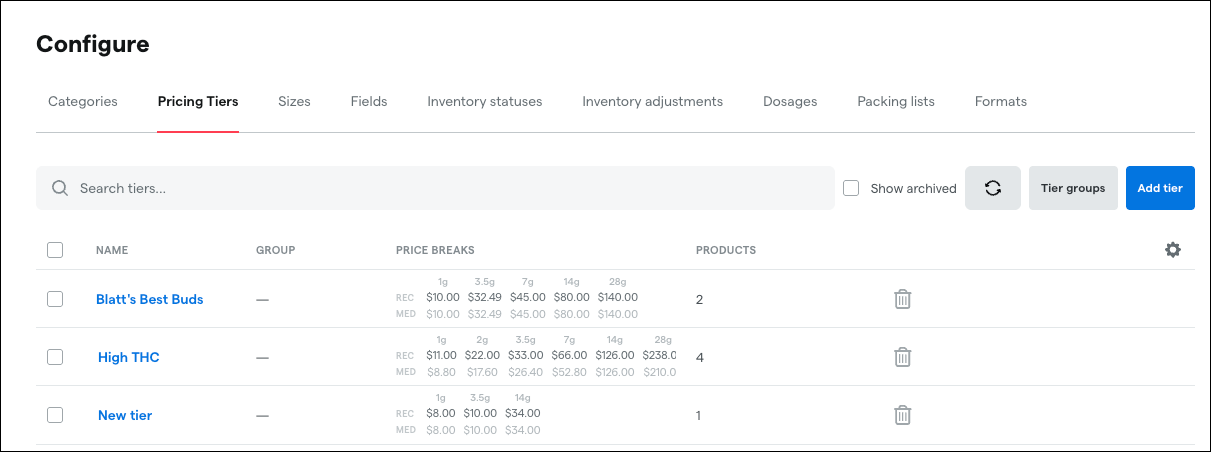
We’re launching a new-and-improved interface for creating and managing pricing tiers in the Backoffice.
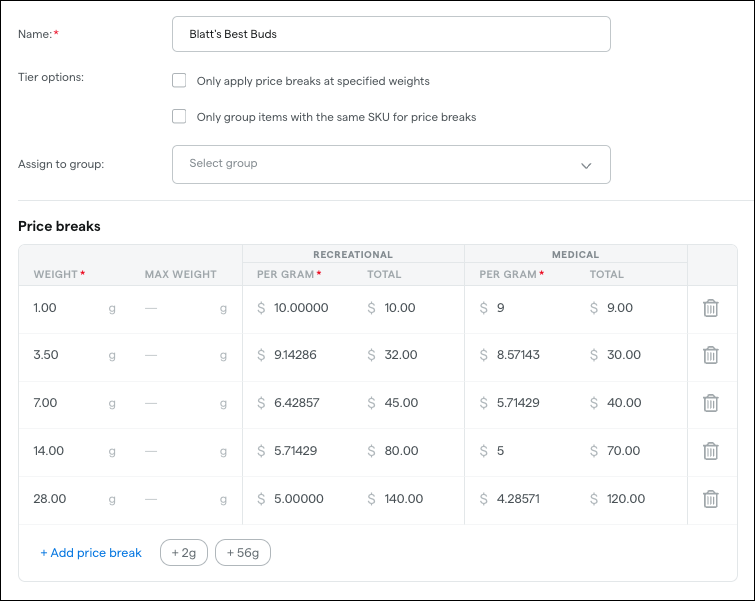
The Pricing Tiers tab under Products > Configure will show more detail about each tier, including it’s tier group assignment (if applicable), an overview of its price breaks, and number of assigned products. Tier groups will be reorganized into their own secondary view by clicking the Tier groups button.
You can then select a tier to edit its Tier options, assign it to a tier group, and view and edit its price breaks in a new more user-friendly in-line editing table
Loyalty & Marketing
When scheduling or sending an SMS campaign during SMS quiet hours, Dutchie will display a warning about SMS quiet hours and an option to override and schedule/send the campaign anyway.
You can now insert a Customer ID merge tag when building email campaigns in the Campaign Editor. This merge tag dynamically populates each recipient's unique customer ID at send time, just like other personalization tokens such as first name or loyalty points. If you use external loyalty platforms, CRM tools, or other systems that rely on customer IDs, you can now embed that identifier directly in your email content, links, or tracking parameters — no manual workarounds needed. Select the Customer ID merge tag from the merge tag options in the Campaign Editor when composing your campaign. For more details, see Use dynamic content in campaigns.
Segments
When viewing a segment, only associated discounts are displayed — workflows and campaigns linked to that segment are not visible. With this update, we're adding a new Associations tab to segment details so you can see a segment's associated discounts, workflows, and campaigns, giving you a complete picture of how each segment is being used across your operations.
In segment audience lists, customer names will become clickable links that open the customer’s profile in a new tab.
Discounts
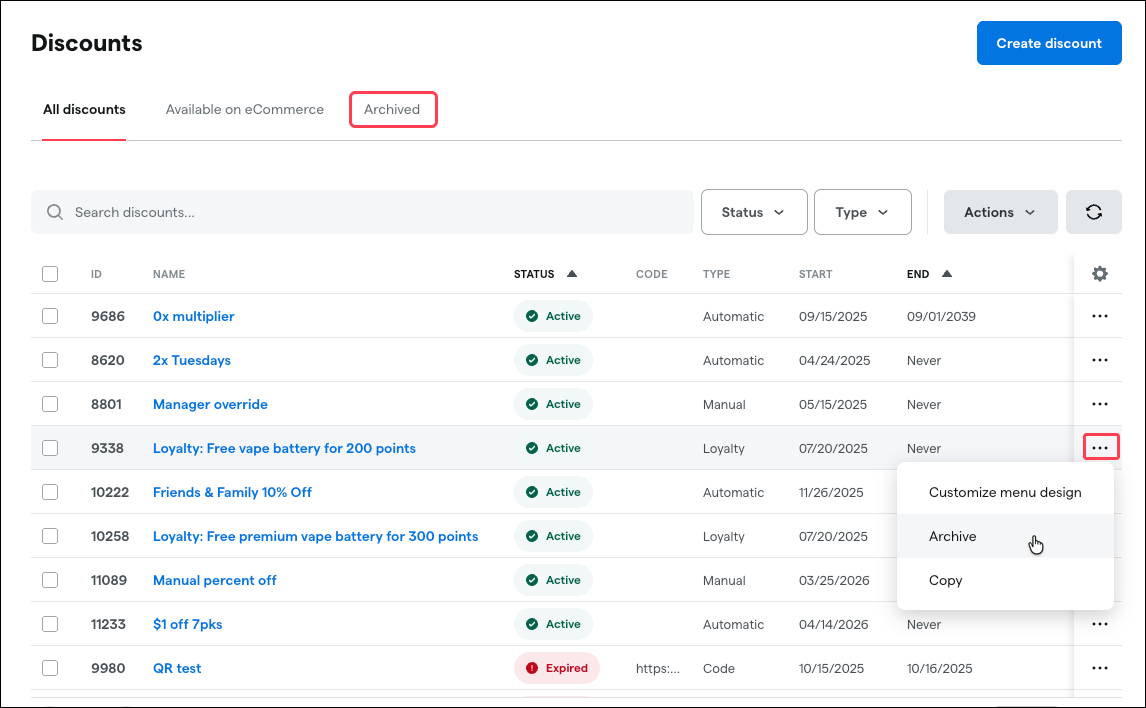
You can now archive discounts by selecting the ellipsis (…) next to an existing discount, or by selecting discounts and then Bulk actions > Archive. This hides a discount from the Backoffice and Register without deleting it, and you can view and restore archived discounts any time from the new Archived tab. Previously, archived discounts could not be restored.
Reports
The Inventory Audit report export is getting new key variance data fields and a new configurable column:
Expected Quantity, Counted Quantity, and Adjusted Quantity are now available in the export, giving you a complete view of inventory variances without needing to manually reconcile data outside the platform.
Report Date is now included in the export for easier record-keeping and audit tracking.
Vendor has been added as a configurable column, so you can filter and analyze audit data by vendor alongside the existing Brand column.
These enhancements make it easier for inventory managers to identify and analyze discrepancies directly from the exported report, especially across multi-location operations.
Compliance
Vermont:
Incoming inventory with expired or soon-to-expire VCCB registrations will now trigger a warning message when receiving inventory. This warning will not block receiving.
P-numbers will be shown in a Product External ID column on the Inventory page, matching existing functionality in the Catalog.
Register
Control which product categories a patient is permitted to purchase using the new Allowed Product Categories setting in the Medical tab of the patient profile.
Select one or more product categories from the dropdown to define what a customer is allowed to buy.
If a staff member tries to add a product from a category that isn't on the customer's allowed list, the register will block the addition and display an error notification.
If no categories are selected, no restrictions apply — the customer can purchase from any category, just like before.
This gives dispensaries more precise control over customer purchasing at the register, helping ensure compliance with patient-specific product requirements.
Dutchie Public API
The GET /preorder/Status endpoint now returns productId, packageId, and allocatedInventoryId on each entry in the items array when includeLineItems=true is set.
Previously, allocated line items only included productName, quantity, totalPrice, totalDiscount, and totalTax, but no unique identifiers that could be used to cross-reference products, packages, or allocations in other API calls. With this update, integrators can now programmatically look up and reconcile preorder line items against catalog and inventory data without relying solely on product names.
Settings
The Location setting Enable Cars and Drivers for Wholesale will be deprecated. This setting was used to expose Cars and Drivers in the Delivery section of the Backoffice for locations that did not offer consumer delivery but still needed to configure cars and drivers for wholesale transfer operations. Enabling this setting will no longer be necessary for wholesale purposes, and all locations will now see a Delivery section in the Backoffice sidebar menu housing Cars and Drivers tabs. This does not affect existing functionality, and no action is required.
Fixes
We’re releasing fixes for the following issues:
We’re adding support for Retail ID scanning after partial room moves. Retail ID associations will carry over when part of a package is moved to another room, so QR code scanning works as expected for moved inventory.
The Transactions by Register page shows stale current balance data that does not match the actual register ledger balance.
In Metrc return reporting, returned items will use the actual return date instead of the original sale date, helping Oregon customers avoid backdated compliance records.
Certain bulk or unit-mismatched inventory items could not be added to the cart and produced an “Attempted to add too many items to cart” error.
For external loyalty rewards (Springbig, Alpine IQ), a reward that has already been applied in a cart will no longer appear as an available discount that can be applied again.
We’re fixing inventory receiving validation so packages cannot be received with a negative quantity, and users receive a clear validation message when that happens.
We’re fixing rounding errors in Receive Inventory so cost per unit and total package cost calculate cleanly without long floating-point decimal values.
Non-Loyalty & Marketing subscribers are unable to assign or remove customers from customer groups on the customer details page.
MMUR delivery device details will display in the list view when they are populated on the product record.
In the Certificate of Analysis “Paste a URL” flow, reachable links to non-parseable landing pages will still be saveable as reference URLs instead of failing completely.
A reporting access prevents the Run Report button from appearing for some users despite matching permissions.
When multiple discounts share the same code, the active valid discount will be applied instead of an older expired one.
We’re fixing Kentucky medical allotment calculations so flower equivalency conversions are respected when using the new cart allotment calculation workflow.
When creating discounts with the External loyalty redemption type, the system will default the redemption type to Manual.
The Inventory Transaction API returns incorrect timestamps shifted by 4–5 hours from the actual transaction time.
