- DATE:
- AUTHOR:
- Dutchie Product Team
Dutchie POS: Block checkout for unfulfilled pre-orders, HID scanner support for package ID fields, clearer guidance for loyalty settings applicability, reporting enhancements, improved allotment tracking, and much more
Here's what's new and coming soon in Dutchie POS. Subject to change.
Coming Soon: Connect in your Dutchie Backoffice (currently a Beta program)
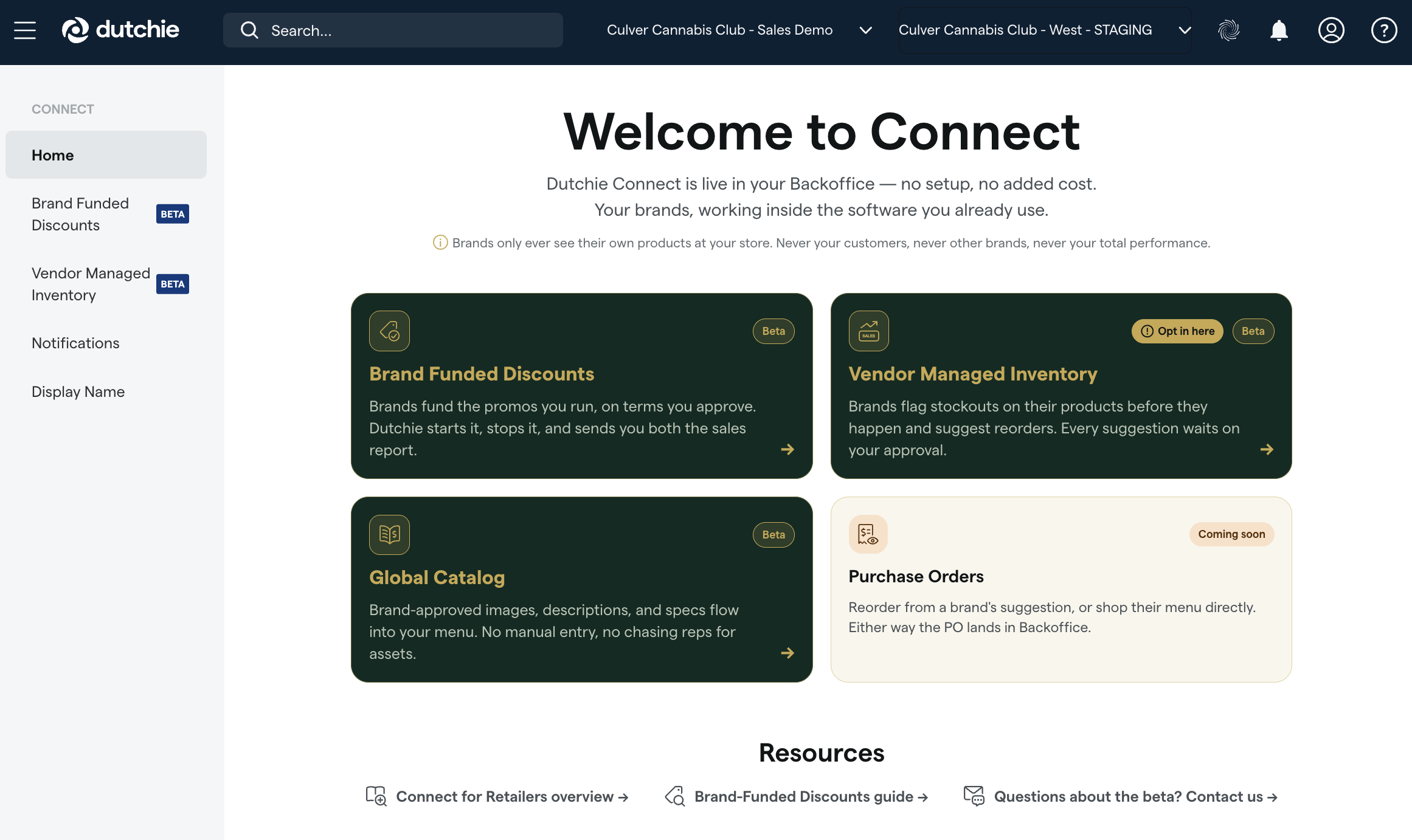
Find Connect in your lefthand nav. See which brands have offered to fund discounts at your store and opt in to Vendor Managed Inventory to be better served by the brands you carry. No setup, no added cost to retailers.
Requesting discounts from brands, purchase orders straight from Backoffice, and brand-approved content from the Global Catalog are next.
Enhancements
Settings
Optional hard gate on unfulfilled pre-orders. A new setting (Settings > Location > Require Pre-Order Fulfillment at Checkout) will block checkout entirely when a pre-order item hasn't been fully fulfilled, instead of only showing a dismissible warning.
Inventory
HID scanner support in Backoffice package ID fields. Backoffice Package ID fields will soon support scanning with HID (direct hardware) barcode scanners, in addition to manual entry.
AI lab results parsing: When Dutchie's standard COA parser can't recognize an uploaded lab results file, Backoffice now offers a Try AI-based parsing option — turning what used to be a hard failure and full manual entry into a one-click retry, with the user still reviewing everything before saving.
Loyalty
Clearer guidance for loyalty settings that apply across locations. We’re adding tool tips to Loyalty settings to show when changes apply across your entire organization rather than a single location. This will help multi-location retailers avoid unintended global changes and gives teams more confidence when updating loyalty configuration.
Enhanced AIQ redemption process to perform a final up-to-date balance check during checkout, which may introduce more failures at checkout if a consumer doesn’t have enough points.
Customers
Broader access to marketing segment data via the Customer API. The includeSegments parameter and related segment data will now available to any API key with Customer scope access.
Reporting
E-Commerce order number visibility in POS. We’re adding E-Commerce order number visibility to Transaction History in the Register and Backoffice, making it easier to reconcile an online order with its in-store transaction.
Pay by Bank in Business Intelligence reports. BI tools will identify Pay by Bank as its own payment method, making Pay by Bank transaction activity easier to find, filter, and analyze. This improves visibility into digital payment adoption and helps teams avoid manual reconciliation of Pay by Bank activity from cash or unknown payment categories.
New report: Allotment Overrides by Location. We’re adding a static report listing customers with a purchase-limit override at a given location, including the override amount and who last modified it. Correction: Instead of adding a new static report to track allotment overrides, we've added columns to the Customers list in Backoffice: Allotment Overridden (yes/no), Current Limit Override, and Max Limit Override, along with a checkbox for Only show allotment overrides, which filters the Customers list to only show customers whose limits have been overridden. The Bulk actions menu in the Customers list also now includes a Reset allotments option. To view the history of allotment overrides for a customer, including which employee did an override and when, open the customer profile and select History > Profile history.
Discounts
Price-based product eligibility filters. When configuring product eligibility filters in the Discount Wizard, you can now restrict a promotion to products above, below, or within a price range — enforced automatically at checkout instead of relying on staff to eyeball prices at the register.
Compliance
Allotment override tooling improvements. We’re improving how dispensary operators view, filter, and audit customer purchase limit overrides in the Backoffice. These enhancements will make it easier to identify customers with custom allotment limits, ensure consistent limit status reporting, and improve internal audit accountability.
What’s New:
Filter by Allotment Overrides: A new filter option—"Only show customers with an allotment override"—is now available on the Customers list. Operators can quickly isolate and review customer profiles that have active allotment overrides without needing to paginate or manually sort through their entire customer database.
Accurate "Allotment Overridden" Column Status: The Allotment Overridden (Yes/No) column in the Customers table now evaluates both Current Purchase Limit Override and Max Total Purchase Limit Override. The status displays as Yes if either override is present, providing an accurate, at-a-glance view of custom limits.
User-Attributed Audit Logging for Reset Allotments: Performing a Reset Allotments action now reliably logs the specific user ID of the staff member who initiated the reset. This ensures full traceability and auditability for sensitive compliance and limit modifications.
How to Use
Navigate to Backoffice > Customers.
Select the "Only show customers with an allotment override" filter checkbox to instantly view only accounts with active overrides.
Review the Allotment Overridden column to verify customer limit override statuses.
Historical allotment details for completed transactions. Register Sales History and Backoffice Transaction Details will include information about allotment history to help users better understand how each item in a past sale affected a customer’s allotment, while clearly indicating whether the information was captured at checkout, reconstructed from available facts, or unavailable.
Manufacturing
Assembly output waste reporting. Assembly output waste will now be captured and reported to BioTrack and static reports, with a new Waste field on the Assembly Output details card in Backoffice.
Faster product selection in manufacturing workflows with UPC search. When adding products to Bills of Materials or selecting category-based Assembly outputs, teams will be able to search by UPC in addition to existing product details. This makes barcode-driven workflows faster, reduces manual product selection errors, and helps manufacturing teams find the right product variant more reliably.
Register
New “Retain status” option for default order status triggers. Register configuration will support a “Retain status” choice for Guestlist default status triggers (Backoffice > Registers > Configure > Guestlist status), helping teams prevent unwanted automatic order status changes due to a field being left blank. This is especially useful for hybrid pickup and delivery workflows where orders may need routing or manifest updates without moving out of their current Guestlist lane.
Integrations
Government ID photo capture for GoodCanna medical intake. We’re updating the GoodCanna medical card intake workflow with Government-ID Photo Capture and Multi-Layered Duplicate Prevention. This release ensures patient intake records accurately match state registries and legal IDs, eliminating duplicate profiles and preventing dispensing blockers at checkout.
What’s New:
Government-ID Upload During Intake: Patients now upload a photo of their government ID (e.g., Driver’s License or State ID) during intake.
Sync to Dutchie POS Profiles: Uploaded ID photos automatically attach to the patient’s Customer Profile in Dutchie POS (Leaflogix) for quick verification at check-in and checkout.
Provider-Side Identity Verification: ID photos are forwarded directly to the GoodCanna provider portal, allowing evaluating physicians to verify patient identity during consultation calls.
Dual-Layer Verification & Data Correction:
State Registry Check: Validates applicants against the official state patient registry using Driver’s License number (primary) or Name + DOB (secondary), automatically correcting typos and pulling official state medical marijuana IDs.
6-Tier Duplicate Matching: Matches applicants against existing Dutchie records (Account ID → DL# → State MMJ ID → Email+DOB → Phone+Last Name+DOB → Full Name+DOB) to update existing profiles rather than creating duplicates.
Proactive Duplicate Prevention: Warns logged-in applicants who already hold an active, unexpired medical card prior to intake submission.
Dispensary Impact & Staff Action:
Where to View IDs: Open the patient’s record in Dutchie POS and navigate to the Customer Profile tab to view the attached government-ID image.
Dispensing Check: Cross-reference physical IDs against the stored image and profile details during in-store pickup, curb-side, or delivery check-in.
Fixes
We're releasing fixes for the following issues:
Entering a counted quantity during inventory audits could revert to 0 when typed quickly.
Bulk concentrate products weren't pulling correct inventory or allotment data at the register.
Printing inventory labels could fail with a server error when printer information was missing.
The Inventory Snapshot report showed incorrect counts for SKUs affected by back-dated receives.
Expired IDs weren't being flagged during ID scans.
Terpene panel results were missing from lab result PDFs uploaded from certain lab platforms.
A duplicate receive could be missing from Order History.
The ephemeral cart could double-apply loyalty point redemptions during recalculation.
The unarchive drawer didn't populate for manual discounts (MTDs).
A manifest credit wasn't visible to the customer immediately after intake.
A package move could complete in Dutchie without being reflected in Metrc, with no error shown.
Reading a timestamp during the Eastern time daylight-saving transition could cause a crash in additional cases.
The product name was missing on printed return receipts.
The location filter on Customer Segments didn't persist when switching between tabs.
A code discount configured for "Exactly 1" reward condition applied to all matching items instead of capping at the configured quantity.
The loyalty opt-in status on the profile completion badge didn't update after opt-in was disabled.
Abandoned or voided carts could still count against a customer's redemption limit.
Transactions of $0.02 or less couldn't be finalized when Swedish rounding was enabled.
Users could be prevented from resetting their password to log into Back Office.
Automatic discounts using a cooldown or refresh redemption limit could become permanent lifetime caps instead of resetting.
The Register Complete Profile modal showed a customer as not enrolled in loyalty even when opt-in wasn't required.
The invoice number wasn't included when creating Metrc transfer templates in New York.
The Public API's loyalty configuration response omitted the max redemptions per transaction value.
The allotment details view could crash due to unexpected patient status data.
Applying a vendor credit to unit cost during inventory receiving could silently reset if the receive was saved and reopened before finalizing, so the credit was never actually applied.
A transaction that failed partway through a return could get stuck in a "Returning" state, blocking any further return attempts on that transaction with a "cannot modify transaction" error.
Print Cart tickets could merge items from different Metrc batches into a single line, making it unclear which physical packages to pull.
Recreational customer profiles incorrectly labeled and stored their primary identification as an MMJ ID instead of a driver's license; medical profiles were unaffected.
Loyalty points expiration dates could be missing for customers who received loyalty grants before their first transaction.
Audit log entries for changes like product name updates could be silently truncated to 30 characters due to an unnecessary data-type cast, losing part of the recorded value.
The Inventory Snapshot report could show inflated quantities and costs, along with room names that don't exist at the location, due to a join that could pull in unrelated historical receive records from other locations.
A loyalty reward with a minimum cart-spend requirement could still be applied at E-Commerce checkout even when the cart didn't meet the threshold, showing a lower price than what was actually charged once the order synced to POS.
During a non-blind inventory audit, confirmed packages could intermittently revert to the Uncounted tab after a refresh, and the Confirm button could remain disabled or fail to save.
The Discount Detail Report's Discount % column calculated against net price instead of gross price for tax-inclusive locations, producing wildly inflated percentages.
A "buy X, get exactly 1 free" discount spanning multiple SKUs could discount more than one reward item instead of capping at one across the group.
