- DATE:
- AUTHOR:
- Dutchie Product Team
Dutchie POS: Assign pricing tiers based on tags; customer dedupe tool; catalog UX improvements; fixes
Enhancements
Dutchie Register
Add items to a customer's pre-order in the Dutchie Register, even after your team has already picked and packed the original order. Learn more in the Help Center.
Pricing Tiers
Automatically assign products to pricing tiers based on a tag or smart tag. When used with smart tags, this option allows you to set up dynamic, rules-based pricing. For example, configure smart tags with rules based on strain, brand, or potency and assign those tags to different tiers accordingly, assign "Expiring Soon" packages to a "Value Tier” to sell through aging inventory, etc. Note that tag-based pricing tier assignments override product-level pricing in your Catalog.
Customers
The Customer Dedupe tool helps you find and merge duplicate customer profiles in Dutchie Point of Sale Backoffice. Instead of relying on a single, fixed set of matching rules, you can combine multiple identifiers, such as driver's license and date of birth, to find matches that fit the way your business defines a duplicate. The system also calculates a confidence score for each potential match so you can decide how much oversight you want before profiles get merged. Learn more in the Help Center.
Catalog
Catalog dropdowns are being updated for a more consistent and easier-to-use experience. Fields such as category, external category, dosage, and size will use searchable dropdowns with clear and refresh options, making product configuration and edits faster when working with long lists of options.
Loyalty & Marketing
Loyalty programs in Backoffice will support up to 20 configurable tiers, increased from the previous limit of 4. Tiers are also displayed in ascending order by spending threshold, making loyalty setup easier to review and manage.
You can now switch SMS/MMS marketing links from the default date-of-birth age-gate to a PIN-only verification flow. This is especially useful for locations with unreliable customer date-of-birth data on file. Go to Marketing > Configure > SMS Settings and choose from:
Age gate - consumer enters a date of birth that must match the one on their profile.
Select birthdate from a list - consumer picks their date of birth from several options. Those without a date of birth on their profile receive a PIN.
New PIN for every message - consumer receives a new PIN to enter each time they click a link.
Dutchie Public API
Public API partners can now add multiple product images in a single request. The new endpoint supports image URLs or base64 images, display sort order, and safer batch processing, making catalog image onboarding faster and easier for integrations.
Compliance
Massachusetts: The MassCIP Users modal (Settings > Integrations > MassCIP > Users) now includes a search bar and active-user filtering to make managing credentials faster, especially for locations with large employee rosters.
Washington: The DOH Approved validation view (Settings > Integrations > CCRS > Validation > DOH Approved) now lets you filter products by their retired status, making it easier to focus on active inventory during compliance reviews.
What's new:
Retired / Not Retired filters — Toggle between retired and active products so you can zero in on the items that still need attention for your next CCRS submission.
New "Retired" column — A dedicated column in the grid gives you immediate visibility into each product's status without needing to open the product detail.
All statuses shown by default — The filter starts with all options selected, so you always see the full picture when the page first loads.
Dutchie Backoffice: Brand-Funded Discounts entering Beta
Here's what's new in Dutchie Connect
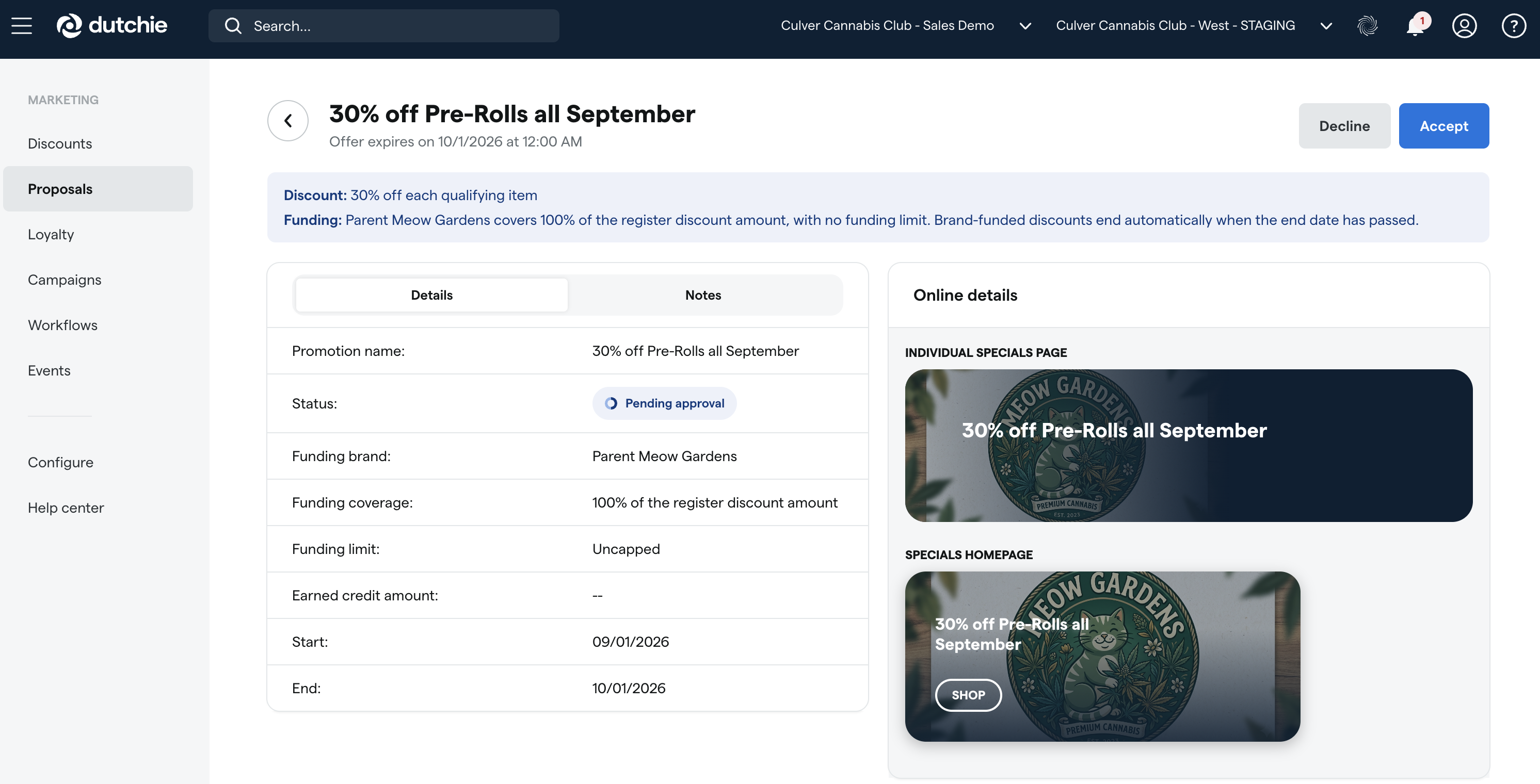
Brand-Funded Discounts (Beta — rolling out over the coming weeks)
We're launching Brand-Funded Discounts in Dutchie Connect, so in the coming weeks you may start receiving discount proposals from the brands you work with, right in your POS. No action is required today — but accepting a proposal is how you put it to work at your store. Check out our retailer guide at the link above for what to expect.
Fixes
We’re releasing fixes for the following issues:
Delivery credits are not being distributed to individual item costs when receiving inventory, even when the Apply both credits and shipping charges to unit cost option was selected.
Smart tag rules with a large number of selected categories are silently losing rules after saving, resulting in partial data loss.
Exporting the Registers Overview Report produces an empty file despite data being visible on screen.
Manually entering a total price when adding inventory to a wholesale order may result in a one-cent rounding discrepancy.
The MMJID (MJ state ID) field on customer profiles lacks validation for MMIC customer types, allowing incorrectly formatted IDs to be saved.
The Receive Inventory screen displays the catalog cost instead of the cost from the vendor’s manifest or transfer when receiving against a pending transfer.
Alpine IQ loyalty discounts may incorrectly show a Max redemptions limit reached error on the first use due to a hidden limit carried over when copying from a code-based discount.
The existing batch dropdown is greyed out when creating a recipe batch in Processing locations, preventing users from selecting eligible batches.
Searching inventory by batch numbers ending in an uppercase letter may fail to return results because the system misinterpreted certain all-uppercase terms as retail IDs.
The Marketing Overview may get stuck loading indefinitely, leaving the Export button disabled and preventing users from exporting report data.
The Cost per unit field does not automatically populate from the Catalog when receiving inventory, requiring users to enter costs manually.
The Inventory Snapshot report may show incorrect counts when back-dated receives were added, causing inventory quantities to appear inaccurate across SKUs.
Scanning a medical card with VeriScan may create a duplicate customer profile instead of matching to the existing customer record.
Loyalty enrollment reporting may produce inconsistent monthly enrollment results because of timezone-dependent date handling.
Large plant transfers from Inbound & Delivery to Cultivation may time out or fail, forcing users to process plants in small batches or one at a time.
Returned items may not automatically restore redeemed loyalty points to the customer’s balance, requiring manual loyalty adjustments after a return.
Delivery addresses submitted with online orders may not populate on the customer profile in POS or Backoffice, requiring staff to enter the address manually.
