- DATE:
- AUTHOR:
- Dutchie Product Team
Dutchie POS 1.179: Real-Life Events; separate fees for ASAP and Scheduled Delivery; group- and segment-specific discounts now available online; fixes
Projected release dates: 3/9/26-3/12/26, unless otherwise noted. Subject to change.
Enhancements
Marketing
Real-Life Events allow you to track brand awareness, acquire new customers, and measure the ROI of in-person activations like store openings and festivals. For example:
Ongoing Community Building (Examples: run clubs, local recurring meetups): Foster long-term brand affinity by hosting recurring local meetups. Consumers can join at any point and earn an automated loyalty point boost for joining.
High-Impact Launch Events (grand openings, new product launches): the Events feature can be used to drive foot traffic during critical windows, like a grand opening or launch of a new product. Use the platform to manage high-volume check-ins and reward attendees with exclusive "swag kits" featuring a free pre-roll and branded tote bag.
Off-Site Lead Generation (concerts, festivals, local events): Capture "top-of-funnel" interest at events that take place outside your shop. Distribute unique QR codes at local concerts, festivals, and local events; folks can redeem for a free pre-roll or other product of your choice.
Brand Partnerships (in-store popups): Host a short 4–5 hour pop-up with a partner brand where customers receive an immediate 20% discount on featured products, allowing you to track the specific lift from vendor-driven events.
This feature automatically creates a customer segment for the event attendees. Learn more in the Help Center.
Settings
You can now configure separate delivery fees to automatically apply to ASAP vs. Scheduled Delivery in Dutchie E-Commerce.
In Settings > Fees & donations, when creating or editing a delivery fee where the Application type is set to Automatic, choose whether to automatically apply the delivery fee online. If you select Yes, you have the option to Select Delivery Types (ASAP Delivery or Scheduled Delivery). By default, the fee will apply to both delivery types.
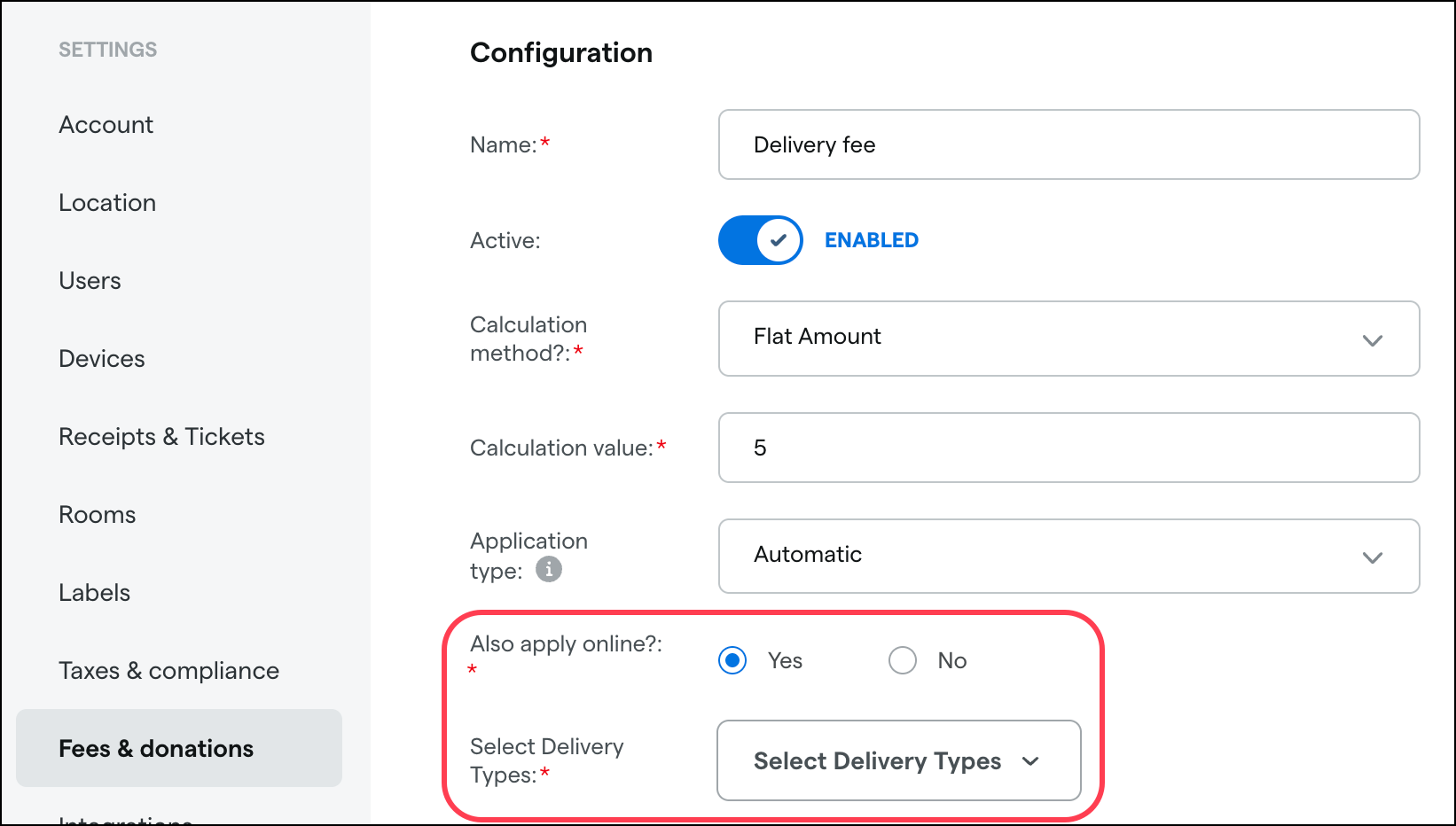
This feature is available now.
Discounts
Discounts with customer group and customer segment conditions now appear in Dutchie E-Commerce. Previously, these discounts were available only in the Dutchie Register and were not reflected in E-Commerce menus or checkout.
Note that although these discounts will appear online for logged-in users in the specified groups/segments, they will not visible in Dutchie E-Commerce Admin. This functionality is now enabled for all locations with Discount Sync enabled.
Inventory
Inventory audits will be sortable by Adjustment Qty.
We’re adding a Brand filter to the Inventory table.
Reports
An earlier version of this post incorrectly stated that we were releasing a new MI Wholesale Report showing all wholesale inventory sold so producers could track how much wholesale tax is due to the state. Instead, Michigan wholesale tax reporting has been incorporated into these existing reports:
Completed Transfer Orders
Completed Transfer Orders - Detail
Completed Wholesale Orders
Completed Wholesale Orders - Detail
Sales Report Transfers
Fixes
This release includes fixes for the following issues:
Editing or clearing any fields when enrolling a customer in Dutchie Loyalty via the Register overwrites or clears required patient profile data, leaving important fields blank.
A generic "object reference" error may prevent users from opening pending transfers on the Receive inventory page.
Users sometimes see a "The specified blob does not exist" error when attempting to download files from a customer profile, preventing access to those files.
Receipts for Pay by Bank orders appear to send successfully but are not actually emailed to customers, while cash receipts send as expected.
New products assigned to a product category with global subcategories do not retain those subcategories on the product’s Online details tab.
The Campaigns list sorts the Last Modified Date as text instead of by actual date, resulting in incorrect sort order.
Rapidly changing Counted Qty values in a blind inventory audit can make adjustment quantities visible to users without the necessary permissions.
