- DATE:
- AUTHOR:
- Dutchie Product Team
Dutchie E-Commerce: Scheduled Collections for seasonal promotions; Mobile app updates
Here's what's new in Dutchie E-Commerce:
Collections
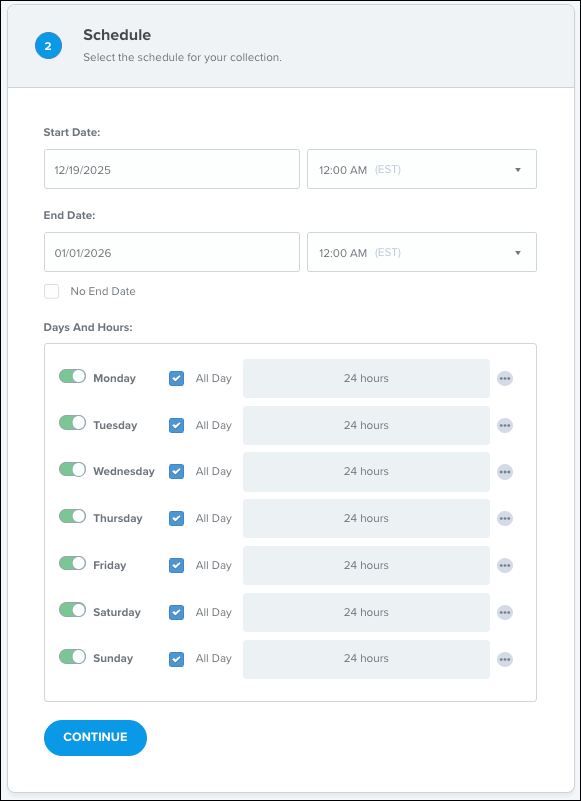
You can now schedule Collections to automatically appear during specific days and times and/or during a certain date range, allowing you to promote seasonal and recurring marketing initiatives without having to manually publish or unpublish. Learn how in the Help Center.
Mobile app
Updates and enhancements
The minimum required version for Dutchie mobile apps is now 1.1.2. Consumers running older versions on their devices will now be automatically prompted to update the app with a link to the relevant app store.
A live activity widget now shows real-time order progress directly on the consumer’s lock screen and notification area.
Consumers can now see their Springbig and Alpine IQ points on the loyalty tab and at checkout, and redeem points at checkout.
Pay by Bank users can now re-link their bank account within the mobile app, as required by their bank.
Consumers can now submit an app store review after placing an order.
The Categories page now has tighter spacing for easier viewing.
Fixes
The Specials tab was not displaying header images for flat-amount or percentage-based discount promotions.
Discounts continued to appear in mobile apps beyond their end dates/times or on products to which the discount previously but no longer applied.
Some consumers were unable to link bank accounts or complete payment via Pay by Bank in the mobile app.
Flower prices were not updating correctly when the consumer selected a higher weight (e.g., cart showed the 1g price when the consumer selected 3.5g).
Banner links for mobile app did not include the same product filters as in the web version.
Discounts that correctly appeared on the menu and in checkout did not consistently appear when viewing a specific product detail page.
Header customizations, image banners, and navigation colors configured in Dutchie E-Commerce were not consistently reflected in the mobile app.
Some consumers were unable to redeem loyalty points for cash value on the mobile app.
A confusing “Location.ln1 is a required field” error message has been updated to “Please enter an address”
Locations with next-day closing hours configured in Dutchie E-Commerce (such as 7 AM to 12 AM) incorrectly appeared as closed in the mobile app during open hours.
Delivery payment options and fees configured in Dutchie E-Commerce were not shown correctly in the mobile app.
