- DATE:
- AUTHOR:
- Dutchie Product Team
Dutchie POS: Revoke and reinstate referral access; new loyalty program settings; Smart Tag indicators in discount setup; searchable sources in Receive; fixes
Projected release dates: 5/4/26-5/7/26, unless otherwise noted. Subject to change.
Enhancements
Loyalty
Revoke and reinstate referral link access
Revoke bad actors' ability to refer others to your loyalty program, eliminating revenue leakage from referral fraud while maintaining flexibility to correct mistakes.
For example, if a customer appears to be referring themself through their own multiple email addresses, you can revoke their access to referral links and QR codes from the ellipsis (…) menu on Top Referrers:

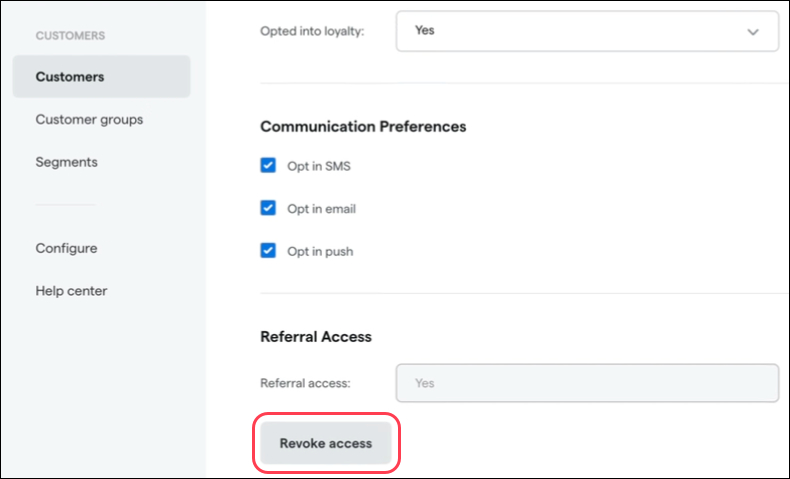
Or on their customer profile in a new Referral Access section.
We’re also adding a Referral Access column to the Customers list so you can see at a glance which customers can access referral links and QRs. Click the cog wheel to access the Column configuration and add this column to your view.
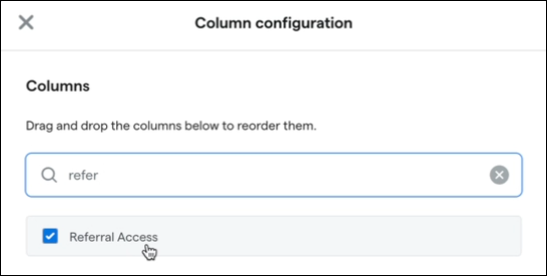
Follow the same steps to reinstate a customer’s referral access.
Learn more about loyalty referrals and revoke and reinstate in the Help Center.
New loyalty program settings
Earning on redemption orders: The default setting, Yes, earn points, preserves existing functionality where customers earn points based on dollars spent, including on orders where they redeemed points. A new No, zero points earned option makes it so customers earn zero points on orders where they redeemed points, regardless of the order total or number of points redeemed.
Allow loyalty enrollment in cart: Select No if you want to hide the Register for Loyalty button in the Register. This prevents budtenders from registering customers for loyalty and ensures that customers complete their own registration via your Dutchie E-Commerce menu or signup link. This can help ensure valid email addresses and phone numbers by making all customers responsible for entering their own information.
Order Type added to segment attributes
Target customers based on Order Type (e.g. delivery, pickup, drive-thru, in-store, etc) within a specified time window. Find this new attribute under Purchase Events.
Discounts
When creating a discount and filtering by tags, Smart Tags will now be visually distinguished from standard tags for easier identification.
Register
Currently, if the patient policy agreement feature is enabled for your location, the text of your patient policy can only be updated by Dutchie. To put more control in your hands, we’re making the agreement text user-editable. Go to Customers > Actions > Edit policy agreement. The patient policy agreement text and patient signature field appear in the Register on patient profiles under the Patient Policy tab.

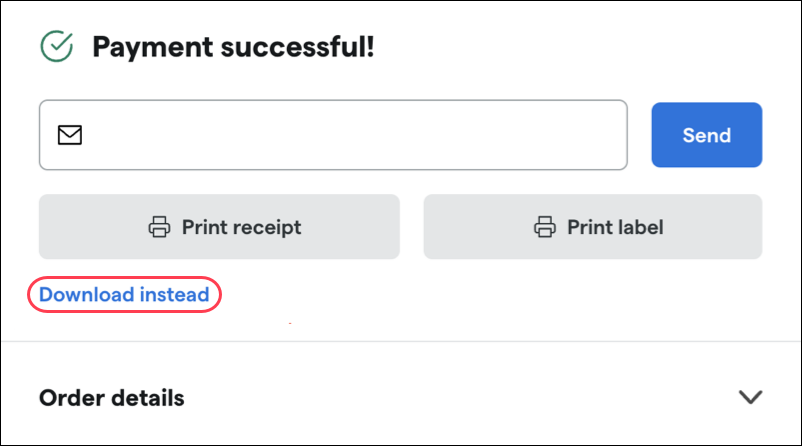
A new Download instead option is now available for receipts and labels when completing a transaction. This downloads receipt and label images to your device, which you can then print on a standard office printer. Use this as a backup if your receipt or label printer fails to print.
Inventory
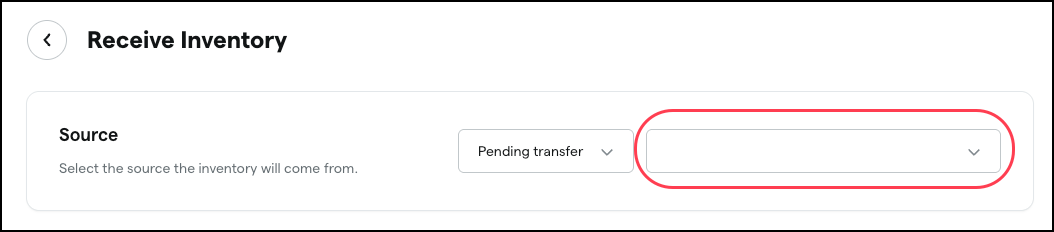
The source selection dropdown when receiving inventory will soon be searchable, making it faster and easier to find the correct source.
A new Label Source field on Metrc Retail ID packages will allow you to edit which package a Retail ID QR code corresponds to. This will be editable for individual packages as well as via bulk actions in Products > Inventory. This will address scenarios where the system-stored Label Source is incorrect and the Retail ID scanned at the Register doesn’t match the physical product, allowing managers to align the system data with the physical item so it can be rung up correctly.
Traceability & Compliance
Transactions posted to Metrc through Receipt Audit will now have their Batch Mode status updated to reflect the successful submission. Previously, these transactions would remain in the Batch Mode queue as pending, even after being successfully posted.
Florida: You’ll soon be able to access the delivery devices dropdown even when MMUR has never been enabled.
Fixes
We will release fixes to address the following issues:
Inventory destruction dates sent to Metrc could appear one day later than expected due to UTC being used instead of the location's local time.
MCDMS integration prevents scans of recreational and out-of-state IDs.
An error may prevent adding items to a cart when the assigned customer type is caregiver.
With certain query parameters, the Dutchie Public API does not return records prior to 2026.
Some customers experience long delays between creating a discount in Dutchie POS and that discount appearing in Dutchie E-Commerce.
Printed Inventory Audit reports are limited to 1,000 packages.
Packages may be assigned to a product other than what the user selected when receiving the package.
Strain information may not populate from the catalog when receiving a saved order.
An Is pickup option that is not applicable in Metrc markets appears during manifest creation. This will be removed from Metrc-integrated locations.
When hovering over menu items on the left sidebar in the Backoffice, submenus could open below the visible area and become impossible to click.
Customer IDs in Referrals are incorrectly formatted as quantities with commas (i.e., 123,456,789)
The Plant Inventory Report as of Date does not correctly reflect inventory as of the selected snapshot date. Plants and clones destroyed or converted after the chosen date could incorrectly appear with future destruction dates or zero quantities. The report will be fixed to accurately display plant and clone counts as of the specified date.
The Connecticut Recreational Excise Tax Report incorrectly includes returned items in its tax calculations, which could cause discrepancies when compared to the Closing Report. The report will be updated to properly accounts for returns, ensuring accurate tax totals that align with other reporting outputs.
