- DATE:
- AUTHOR:
- Dutchie Product Team
Dutchie E-Commerce: Florida MMUR allotments shown in checkout; updated order type prompt; fixes
Enhancements
Florida MMUR allotment display in checkout
When a patient enters their medical card number and date of birth, Dutchie now checks Florida's Medical Marijuana Use Registry (MMUR) and displays the patient’s remaining allotment by product category before they place an order. The result: fewer surprises at pickup, fewer orders that have to be adjusted in store, and a smoother experience for your patients and your staff.
You can choose whether to show a warning that the order would exceed the patient’s allotment and may need to be adjusted upon pickup, or block over-allotment orders altogther.
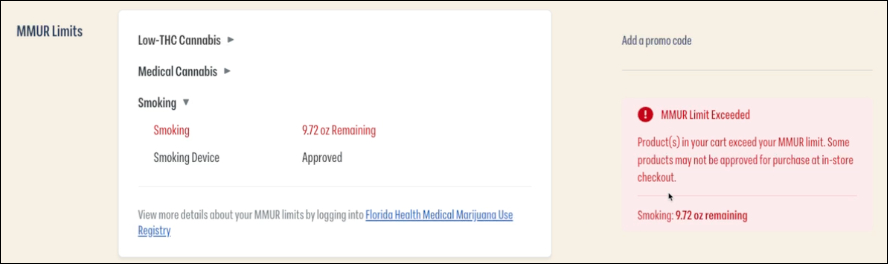
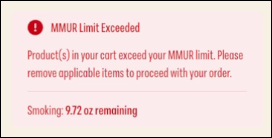
This feature works on embedded, iframe, and subdomain menus for locations integrated with Dutchie POS. Kiosk menus use a separate checkout flow that doesn't yet include the MMUR allotment check, but we plan to add this functionality soon.
Learn more about MMUR allotment display and contact Dutchie Support to have this feature enabled for your location.
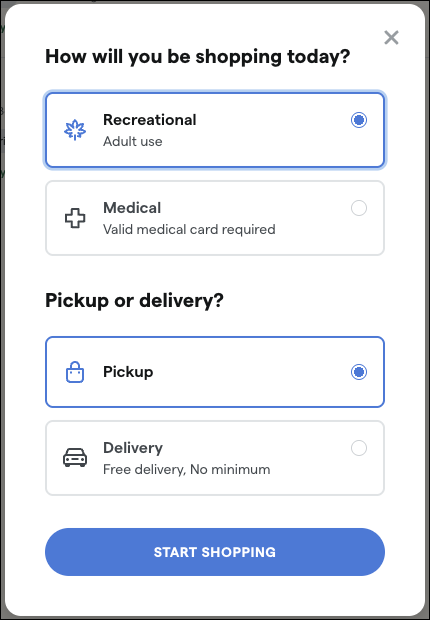
Updated order type prompt
Consumers will now be prompted to select Recreational or Medical in addition to order type when starting an order to ensure the correct menu and pricing is displayed as they build their cart.
Fixes
We’ve released fixes for the following issues:
Online delivery orders could incorrectly use the delivery address from a previous order.
Clicking Save Image after selecting or uploading an category image previously failed with an error; images now save as expected.
