- DATE:
- AUTHOR:
- Dutchie Product Team
Dutchie E-Commerce: Channel-specific homepage carousels, table of contents for printed menus, fixes
Here’s what’s new and coming soon to Dutchie E-Commerce. Subject to change.
Enhancements
Homepage customization
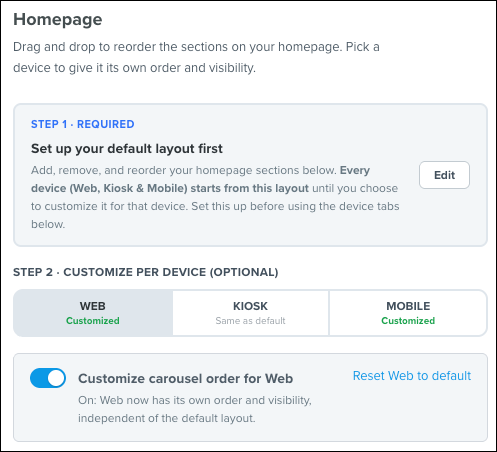
Channel-specific homepage carousels. Tailor homepage carousels independently across web, in-store kiosk, and your mobile app to prioritize what converts best on each surface. For example, spotlight fast-moving grab-and-go items on kiosks, run delivery promos on web, and feature exclusive loyalty deals on mobile.
In Dutchie Admin, go to Customize > Homepage.
Organize your default layout first.
Select the channel tab you want to customize (Web, Kiosk, or Mobile).
Turn on Customize carousel order for [Channel].
Drag and drop rows into your preferred order, or toggle off any carousels you wish to hide.
Check your layout in the preview panel, then click Publish.
Printed menus
Table of contents for printed multi-page menus. Under Page Setup, select Include table of contents to add a directory listing each top-level category with its starting page number and automatically turn on page numbering across your document for seamless in-store navigation and PDF exports.
Compliance
Oregon: Combined Inhalable as a top-level purchase limit category. This satisfies OLCC regulations requiring a separate 10-gram limit for inhalable cannabinoid products (distinct from standard extracts/concentrates).
Fixes
We're deploying fixes for the following issues:
Storefront & Menu
Product and inventory updates could fail to clear the cached storefront page, so shoppers could keep seeing stale pricing or inventory after a change.
Certain dispensary embed/checkout settings keys could get silently rewritten (underscored) when saved, breaking the settings that depended on their exact casing.
A product on special for $0 could show its full (non-sale) price online while showing $0 on printed menus, instead of the same price in both places.
A storefront's live menu category order didn't match the order configured for the website.
A user logged into a deactivated location could get an error trying to view other locations they do have permission to view.
Product-card badges for blanket POS-synced bundle specials could still be missing for dispensaries on the newer menu-pricing sync path, a follow-up gap from an earlier fix to the same badges.
A POS-synced bundle special's reward and requirement product lists could drift apart, showing "Bundle unavailable" on the storefront and in the admin preview even though the special was configured and active.
On Android, the "Add to Cart" confirmation panel on an embedded menu could render off-screen, blocking checkout.
Specials pages slowed down significantly (roughly 3-4x average load time) starting November 9 and had not recovered; this corrects the regression.
The product detail page's title could visibly shift down after the page loaded.
On the admin Past Orders page, searching the product filter returned matches in the dropdown, but selecting one didn't apply the filter.
Partner & Embedded
On partner storefronts, the SDK's "go to store" action could build a broken nested URL, causing store-switching to 404 instead of navigating to the target store.
The SDK's "go to product list" action did nothing when called with no filters, leaving theme developers with no supported way to link to the unfiltered all-products menu.
The Dutchie Plus API's menu endpoint could return a server error when a search request was combined with certain sort options.
On desktop embedded menus, the "Added to Cart" confirmation popup could appear behind the retailer's sticky header, obscuring its heading and close button.
Reliability
Fixed several crashes that could send a shopper to a generic error page instead of the page they meant to see: tapping a texted order-chat link, viewing a chain's store-locations page when a location has no map data, viewing a product whose price options arrive after the initial page load, viewing a product's terpene chart when an active terpene has no matching data, viewing an order confirmation when a dispensary has no payment fees configured, confirming an embedded checkout after an age-verification redirect, and loading the dispensary directory if the map-geocoding service times out or errors.
