- DATE:
- AUTHOR:
- Dutchie Product Team
Dutchie POS 1.170: Dynamic content for abandoned cart campaigns; dynamic URLs for buttons and in-line links; loyalty history reporting improvements
Projected release dates: 12/18/25-12/23/25. Subject to change.
Enhancements
Campaigns
In the Campaign builder, a new Abandoned Cart tile will render consumer-specific cart details in emails and SMS landing pages, including:
HTML content to dynamically display products the consumer left in their cart, including images, brand names, and metadata.
A “complete order” button with a dynamically generated URL that links directly back to their cart.
Notifications in the cart if a product is no longer in stock.
Customization options to match the look and feel of your brand (cart contents HTML cannot be customized)

Dynamic URL options will allow you to insert in-line links or button links to the home page, specials page, or brands page for whichever location a consumer first shopped at, most recently shopped at, or shops at most frequently.
Highlight link text or open button properties, then select Special links > Dispensary menus and your preferred option, which will automatically insert the appropriate merge tag into the link URL.

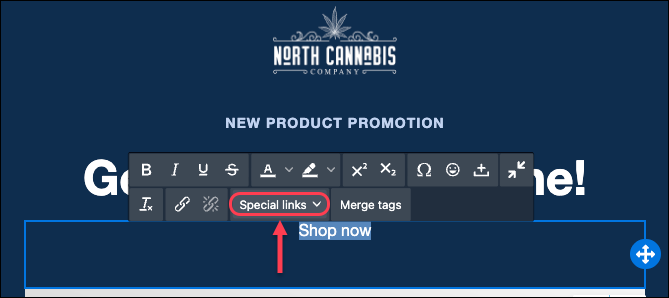
Contact Dutchie Support to have Dynamic URLs enabled for your LSP, and provide your desired default URL in case a specific consumer's first/last/most shopped location can't be identified. This could be your home page, a page listing all of your locations, etc.
Reports
The Transaction History Report will be updated to show each consumer’s full loyalty history including point boosts, manual adjustments, and bulk updates performed by Dutchie Support.
Traceability
In Settings > Integrations > Metrc on the Settings tab, a new Use Metrc Patient Expiration Date option will enforce medical ID expiration dates from Metrc and automatically store them in the ID expiration (Backoffice) / MMJ ID Expiration Date (Register) patient profile fields in Dutchie.
Fixes
This release includes fixes for the following issues
A previously announced update to break down split payments into their respective categories (cash, debit, etc.) in sales reports instead of treating split payments as their own category has now been rolled out to all locations.
Package moves between rooms during an inventory audit may be recorded multiple times, incorrectly increasing total quantity.
In the Discount Wizard, when editing a discount created in the legacy discount builder, deselecting the Specify end date does not remove the discount’s original end date (which was a required field in the legacy discount builder).
The Loyalty Accounting Report shows ending point balances as a dollar amount instead of a simple numerical amount (points).
When registers are configured to require a manager PIN on checkout, a transaction may be completed using the PIN of a user from another location that doesn’t have permissions for the location where the transaction took place.
Some customers receive a “413 entity-too-large” error when receiving packages with Metrc Retail IDs
Delaware: When converting inventory, a required value for serving size is missing from the API request for the Marijuana Infused Solid and Marijuana Infused Liquid categories.
